





Blogs
"Help Me!" - A Guide to Proper Communication in Matchmaking

While the competitive experience in CS:GO changes from rank to rank, there is a thing most players can agree on: communication, the one thing which can win games alone, is lacking, while the in-game voice chat is being used for pointless chatter. Of course, you can't really change the mindset of your whole team, but perhaps by improving your communication, you can inspire other to do the same.
Here are some mistakes often made by players, and some tips to improve your competitive experience. Many of these may sound stupid to you, but I bet most of you have encountered, if not even made all of the mistakes on the list at least once during your competitive career.
Speaking in another language/giving vague callouts
This is mostly encountered in Europe, due to the rich variety of languages and cultures, but other regions can also encounter this problem. We've all had at least one match in which as soon as you join the game, you hear someone screaming and raging in a foreign language. Sadly, in most cases, this goes on for the rest of the match, and this means that you're stuck with someone possibly giving good callouts nobody else understands. It's even worse when you queue up solo and you're the only one speaking English, or giving callouts at all!
The solution for this is extremely simple though, and if you want change, you should start by changing your own attitude. If you queue up for competitive, you should only speak in your native tongue if everyone else in your team speaks it. If not, you should always try to communicate in English, as most CS:GO players should know it.
Also, you should always try to give accurate and specific information. We all know how frustrated you can be when you lose a 1v1, but while you're groaning, you could save your teammates' lives by informing them about the location of your killer.
Cut the chatter
Sure, when you're playing with friends, you want to feel good and you shouldn't be too serious while talking. However, if you're playing with someone outside your group, you should take the discussions to an external VoIP service, such as Skype or TeamSpeak. In fact, even Steam gives you the ability to invite multiple friends into a chat room and start a voice chat.
Don't be a backseat gamer!
 Image courtesy of Dorkly
One of the most annoying types of teammates are the so-called "backseat gamers", who, upon dying, put pressure on you by telling you what to do. Now, don't get me wrong, it's one thing to give accurate callouts and information to the last player alive, but it's another to start yelling at them, start calling them names, and then get mad at them when they fail due to your fault. Also, you shouldn't do things like "clutch or kick" either. It may be a joke to you, but some people might actually take it seriously and start getting frustrated.
If you don't want to hear any tips from your teammates while alone in a tough situation, then you could always use "the clutch button", which you can find in this article. Of course, if you want an easier alternative to this, you could always just mute the one person that's annoying you, but the clutch button allows you to focus properly on sounds.
Hidden voice commands
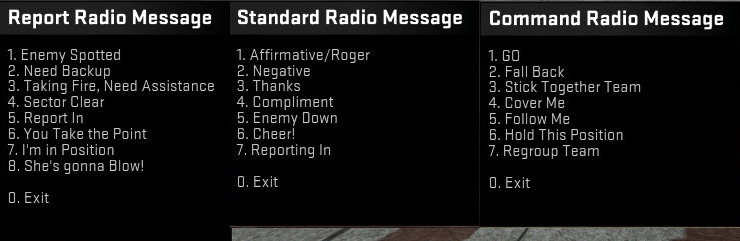 Image courtesy of Steam user [email protected](復古)
Of course, there are some people who actually want to communicate with their team, but they don't have a microphone and they are slow typers. Default in-game voice commands can be useful at times, but many people don't pay attention to them, for some reason, and they often aren't enough to help you get your message through.
A lot of people don't know about this, but CS:GO has some voice commands which were planned to be added, but instead were scrapped. The files are still in the game, and while they aren't exactly useful, using these previously unheard voice commands will draw your teammates' attention to your other commands. The hidden commands are: "Cover me!", "Enemy down!", "Taking fire, need assistance!", "Regroup team!", "Get outta here, it's gonna blow!", "Report in, team!" and "Reporting in!".
By using these you will not get VAC-banned, as you aren't modifying any protected game files. This is just as harmless as editing your HUD font. Thus, you will be able to use these new commands in all game modes, including official competitive and community servers.
If you want to set up these hidden commands, you will have to follow this guide, written by Steam user N3tRunn3r. You will find that the guide is extremely comprehensive, containing everything you need to know about the setup and more. Additionally, if you need further help with the setup, you can ask the guide's creator on that same page.
Are you into fantasy leagues? Then check out AlphaDraft and put together your allstar lineup!