




Blogs
CSGO Keybinding: Getting started

Key binds are used in CS:GO to be able to buy weapons faster and to be able to make sure you have the correct equipment each time with minimal effort. To be able to set keybinds you must make sure that you have the developer console set to a key in the game options. Some players also have key binds set up so they can buy their whole load out with a simple click of a button, you’ll find out how to do all of these in this guide!
How to set a keybind
The first step in setting up your keybinds is to open up your console in the game, this is done by pressing the key you have chosen in the game options.
Secondly you must use the bind command, designed to allow you to set specific functions to a key of your choice. Once you have chosen the key you wish to use you will need to lay it out like below with the button followed by the item you wish to buy.
Example:
bind "ins" "buy galilar"
The above bind would mean that if I was to press the insert key my character would buy a Galil AR and I would not need to do it manually in the buy menu.
All of the weapon names you will need to use are written as they will appear in the game normally, the few exceptions to this rule are:
- HE Grenade: hegrenade
- Smoke Grenade: smokegrenade
- Incendiary: incgrenade
- Kevlar: vest (Kevlar and helmet = vesthelm)
- Defuse kit: defuser
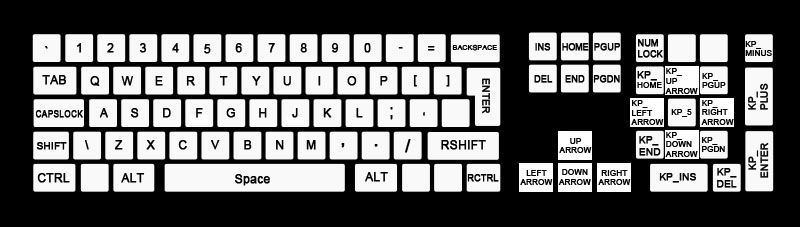
Below is an image of the key names mapped out on a keyboard, these are the names you will need to use when choosing the keys you wish to use when binding, otherwise your binds will not work. Most keys are as they appear on your keyboard including the F1 to F12 keys which are not shown on the image below.
For the mouse buttons you will need to use
- Left click: mouse1
- Right click: mouse2
- Wheel up: mwheelup
- Wheel down: mwheeldown
- Wheel click: mouse3
Any extra mouse buttons should be mouse4 and onwards however it may vary between mice.
Multiple load outs
A more advanced version of key binding is using one button to buy multiple items, this is done by using a semi colon followed by a space with a similair command used in the simpler version
Example:
bind "ins" "buy ak47; buy flashbang; buy vesthelm"
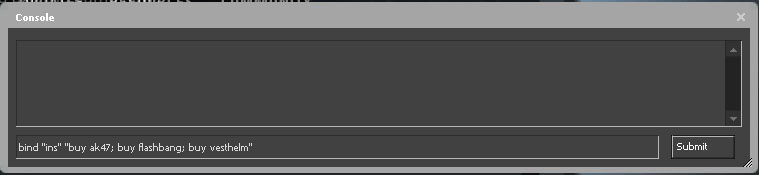
This would mean that pressing the insert key would now buy you an AK47, armour and a flashbang. This is useful since you can create multiple different layouts for your playing styles on different maps and sides or even for different situations in game for example force buys where you could purchase Kevlar and a pistol with no effort!
More keybinds
Another way that keybinds can be used is to send a message to your teammates or everyone in the game just by pressing a button, this can be useful as you can bind messages such as “gh” and “gg” for using during the game. Be careful not to abuse this as some teammates will not be appreciative of your constant spamming of the chat and you might get kicked.
Examples:
bind "[" "say Gh everybody!" < This message would be sent to everyone in the server.
bind "]" "say_team Nice try" < This message would only be sent to your teammates.
Most commands in the game will work with the keybind option so feel free to experiment but be careful not to break the game whilst doing so, if all goes wrong you can use the unbindall command to unbind your keys but you will need to remake any other binds you had before, this should really be a final resort!
Are you into fantasy leagues? Then check out AlphaDraft and put together your allstar lineup!