





Blogs
A Guide To Smartcast Vs. Normal Cast

Overview
In League there are three options to using your abilities: Smartcast, Normal Cast, and Smartcast with indicator. All of these methods do different things and have multiple bonuses and drawbacks. For years members of the league community have debated which one of these methods of casting abilities is the best one to use. This article will look at these three methods of using abilities and attempt to determine whether there really is one that is better than the rest. Each section will be broken into multiple sections detailing the benefits, drawbacks, and when to use each. Finally, the conclusion section will determine whether or not there is a supreme way to cast your abilities.
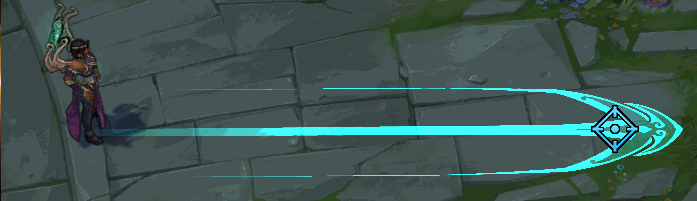
Karma Q on Normal Cast
Normal Cast
Normal Cast is a great option for players newer to the game or whatever champion they are playing. It also the default option for all of the abilities in the game. Just as a refresher Normal Cast gives you a range indicator of your ability when you first press the button, and then after that you left click to cast or right click to cancel your ability.
Pros
- ability to check yourself and readjust your cast
- very beneficial to newer players
Cons
- reduces DPS
- difference in where enemy is when you aim and when ability goes off
- time it takes to aim and then cast
- unable to react as fast as you could if you were using Smartcast
When to Use
You should stick to Normal Cast if you are never to the game or a champion. Later on it just becomes easier and more efficient to use Smartcast once you've learned the ranges of your abilities. Nevertheless, the ability to check your range before you cast is an amazing thing and is a great option you can use whenever you don't feel comfortable using abilities without knowing how far they may reach.
Smartcast
Smartcast is used when you want to dish out as much damage as possible in a short amount of time. What Smartcast does is cast your spell without you confirming the direction it will go. With Smartcast the location of your ability is based purely on the location of your cursor on the screen and nothing else. It is a very fast way to cast your abilities and get combos out.
Pros
- faster reactions due to not having to click to confirm an ability cast
- increases DPS a great amount
- when used to ranges it is much simpler
- abilities get out faster than they would if you had to set your range
- great on bursty champions
Cons
- chance to cast point and click spell on the wrong target
- difficult to judge range of ability if you do not know the champion
When to Use
If you comfortable with a champion and their ranges then Smartcast is a good option. You won't have to click every time you cast to send the ability off, it will just go off instantly. For bursty or combo heavy champions it is also beneficial because it lowers the amount of inputs needed to get your full combo off thus making everything faster.
With Indicator
Smartcast with indicator is a split between Normal Cast and Smartcast. When using Smartcast with indicators the indicator you've come to know and love with Normal Cast appears when you hold down the key for the ability. Once you release the key your ability is cast like it normally would with Smartcast. This is a nifty little feature that allows you to have Smartcast, but you can also check your range like you would with Normal Cast.
Pros
- split between Smartcast and Normal Cast
Cons
- may lower your dps
- chance of accidentally pulling up the indicator when you just want to Smartcast
When to Use
Indicators should be used when you feel comfortable enough to use Smartcast, but you still want to have to ability to check yourself. You really are getting the best of both worlds with this option, you have the ability to have high dps if you need it but you also can recorrect yourself if needed.
Conclusion
In the end all the ways of casting abilities come with their own positives and negatives, but there is not one best option out of the three. Preference is the only thing that matters because at the end of the day it's you that is casting the abilities, not anyone else. You also don't have to feel pressured into using all Normal Cast or all Smartcast either, you can mix and match as you choose. For example, a fair amount of people (myself included) choose to put skillshots on Normal Cast and point and click abilities on Smartcast. One other popular method mentioned earlier is to put abilities on champions you feel comfortable on on Smartcast and champions you are never to on Normal Cast.
Like our content? Support us by getting our merchandise in our shop