






Blogs
A CS:GO Crosshair Guide


Customizable crosshairs have been around since the original Counter-Strike days. Entering a numerous amount commands in the developer console can alter your crosshair in a handful of different ways. Color, style, size, gap size, etc, the possibilities are literally endless. I’ve asked 5 different CS:GO players, including myself, what their crosshair settings are and how their crosshair is useful while in game. Hopefully this guide will give some insight to new players creating their own crosshair.
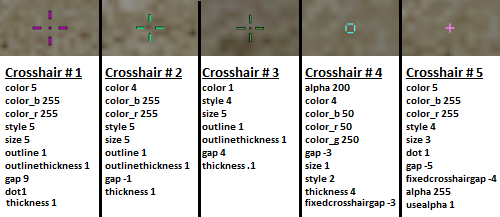
When entering these commands you must start with cl_crosshair (e.g. cl_crosshaircolor 5).
Crosshair #1
This crosshair I use personally. It’s easily visible as it's big and pink. Most players don’t use big crosshairs mainly because it’s just impractical to them. I feel as if I had a smaller crosshair, enemies would be harder to spot at longer ranges for the crosshair would literally cover them. The dot helps at long ranges by allowing more pinpoint accuracy.
Crosshair #2
This is pro player, Eric ‘AdreN’ Hoag’s crosshair, also used by a good friend of mine. I asked him why he uses the crosshair and he said “It’s easy to see, good for close and long ranges and most importantly it doesn’t get in the way when I need to tap dem heads”. Crosshairs similar to this are very common across CS:GO’s community.
Crosshair #3
Crosshair #3 is extremely similar to Crosshair #2, but there is a few small changes. With a tenth of the thickness of a default crosshair, it’s not hard to spot an enemy behind it. A friend that I interviewed who uses this crosshair said “It has a nice big gap on lower resolutions to fit an enemies head, making it easier to get headshots.”
Crosshair #4
This crosshair is extremely unique. When I discovered this crosshair on the CS:GO reddit page, I thought “Who in their right mind would ever use this!?”. After using this crosshair in deathmatch, I quickly changed my mind. It’s perfect for getting headshots at both medium and long ranges. I might even start using it myself!
Crosshair #5
This crosshair is also common. Many people believe small crosshairs are good for getting headshots. I find that they just completely get in the way and block out my whole vision of the enemy at long ranges. But regardless of that, many players find small crosshairs easy to use.
Creating Your Own Crosshair:
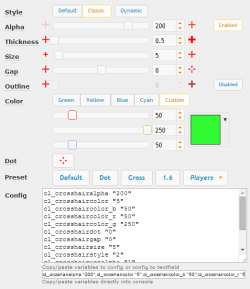
The easiest way to create your own crosshair is through the developer console. To enable the console, go to “Game Settings”, and then check “Enable Developer Console(~)”. Through the developer console you can enter multiple commands to change your crosshair. This website, http://csgocrosshair.dathost.net/, contains a simple GUI which you can alter your crosshair and see it as if you were in game.
Hopefully this article gave newer players a bit more experience on different crosshairs, and why they are important. Believe it or not, crosshairs truly do impact gameplay either in a positive or negative way! There is no right or wrong crosshair, only the one you feel most comfortable with.