






Blogs
Guide to Mechanical Keyboards
shibbyshoo
Wed 14th Nov 2012 - 4:55pm
Thinking about switching over to a mechanical keyboard? This guide is here to help you choose which keyboard is the best fit for you. So go ahead, throw that membrane keyboard out the window and let us dive into the wonderful world of mechanical keyboards.
Overview:
Most generic keyboards are built with plastic domes under each keycap. They’re known as “membrane keyboards”. Each dome must be pressed fully pressed down to make contact with the circuit board underneath. The computer recognizes the contact and registers it as a keystroke.
Now with mechanical keyboards, each key has it’s own physical switch. Once the switch is triggered, a signal is sent with the information of the key you just pressed. Sounds very similar to the membrane method but it does have its benefits. One key thing to remember is that on a membrane keyboard you need to fully press the key down to register the keystroke. On a mechanical keyboard, that is not necessary. The actuation point for a keystroke to register is about 2mm on Cherry MX switches. Pressing down and “bottoming-out” on a key is about 4mm. Overtime, you may notice less fatigue and strain on your hands.
Benefits of Mechanical Keys:
Mechanical keyboards are known to last longer than membrane keyboards. Each switch is expected to last around 50 million keystrokes. While a membrane keyboard lasts around 5-10 million. There is also a feature called, “N-key rollover” that is found in mechanical keyboards. This means no matter how many keys are being pressed at the same time, the computer will still register each one. This is made possible due to each key having it’s own switch.
Try pressing a bunch of keys down on a membrane keyboard and you won’t get the same results. This is especially beneficial in gaming, pressing in a multikey action to save yourself from a group fight or spamming the keys to pull off a multi-pronged harass in an RTS.
Switch Comparison:
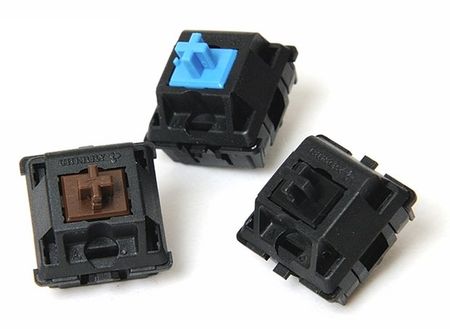
Cherry MX are the most popular of mechanical switches that are found in all kinds of mechanical keyboards. There are four main types of switches: Cherry MX blue, brown, red, and black. Each color represents a different kind of switch with the main differences being the tactile feel, the sound that each switch makes, and spring resistance.
Cherry MX Blue:
The blue switches seem to be the most popular switch floating around amongst the gaming community. It has a light actuation force with a tactile bump and audible click. When the switch is triggered, it gives the user both an audio and "bump" feedback to acknowledge a keystroke has been registered.
If you’ve ever watched a pro player stream and hear clicking noises coming from his keyboard, they are most likely using a keyboard with blue switches. I found typing on blue switches to be extremely satisfying and fun! The amount of noise coming from the keyboard took some time to get used to but I found it to be soothing in the end. This may be your best bet when deciding on a keyboard.
QPad MK-80 - Equipped with Cherry MX Blue Switches
Cherry MX Brown:
Similar to the blue, brown switches also have the tactile “bump” to them. The difference is that there is no clicking noise that goes along with it. Key resistance is about the same as the blues, if not a tad bit lighter. If you like the idea of the blue switches but want a quieter typing experience, give the brown switches a try.
Cherry MX Red:
I have found that red switches are starting to pick up among the RTS players. They have the lightest actuation force out of the four and has no tactile feel at all. Pressing down on a key gets you a smooth action from top to bottom. The light actuation force assists in giving your fingers a break while spamming actions in game.

QPad MK-85 - Equipped with Cherry MX Red Switches
Cherry MX Black:
If you’re looking for a stiff (high spring resistance) switch, Cherry MX black switches are what you’re looking for. These keys take the most amount of force to register a keystroke. It may sound like a negative feature but the high resistance actually helps in preventing accidental key presses. Depending on your style of gaming, you might find yourself having finger fatigue in long gaming sessions. I’d image the Cherry MX Black switches are ideal for FPS gaming, not so much an RTS where you will be spamming keystrokes throughout the game.
And there you have it, you are now a mechanical keyboard master! Remember, it all comes down to preference. If you like the feel of a certain switch, go for it! If you find yourself liking the feel of your current membrane keyboard, more power to you. “The choice is yours and yours alone.” Good luck on deciding which keyboard best suits your gaming needs. Already own a mechanical keyboard? What’s your favorite switch? Let me know in the comments!